Flutter Personal App Agent: A Hands-On Practice
A solo developer's hands-on record: a personal app agent should not copy enterprise architecture — good enough is better. From requirements analysis, a two-level model design, intent recognition, a lean tool system, and local-first data, to the release gates on Google Play, the full journey of an AI-native personal app from zero to launch.
From requirements analysis and architecture design to a Google Play release
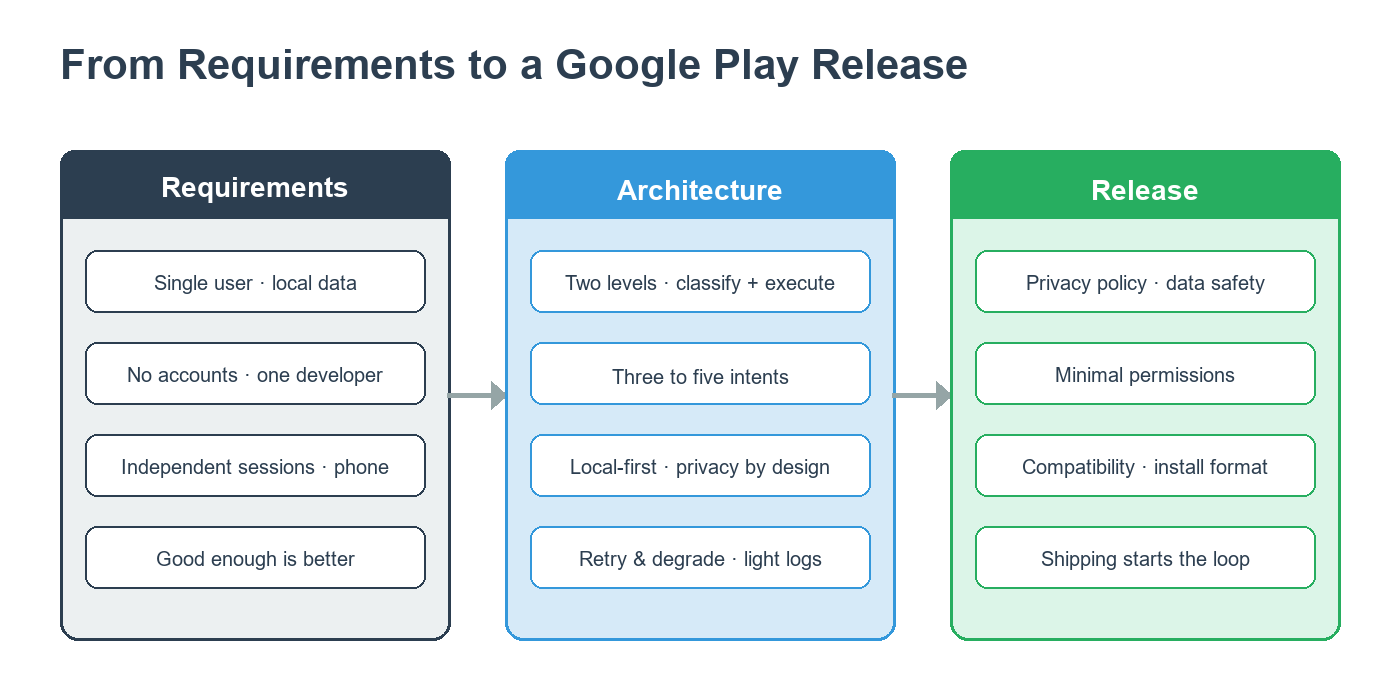
For the past couple of years I have been building a personal reminder assistant, voice-first, in Flutter. It has been a lot of trial and error, and it has also shaped a conviction I keep coming back to: a personal app agent should not copy the enterprise playbook. This article walks through the whole chain — requirements, architecture, and release — and writes down the reasoning behind each decision.
Requirements: why a personal app agent cannot just copy enterprise design
Most of what is written about agents these days takes the enterprise view: a full orchestration framework, a dozen-step lifecycle, eleven states, multi-layer tracing, an audit chain, multi-path retrieval. That makes sense for a SaaS support bot, an enterprise knowledge base, or internal process automation. For the app I am building, that whole stack is far too heavy.
A personal app agent works under very different constraints. The user is a single individual, so there is no multi-tenancy, no permission tiers, no approval workflow. There is no account system, no sign-in, and all data lives locally. It is not a 24/7 service; every use is an independent session. Resources sit on a phone, and users will not wait five seconds. And there is usually one developer, with nobody maintaining a complex architecture.
So the architectural principle for a personal app agent should be: good enough is better. The enterprise stack solves “many people, compliance and audit, high concurrency.” A personal app solves “one person, one thing, fast.” That framing drives every decision that follows.
Architecture: a two-level model, not a full orchestration framework
Enterprise agents typically use an orchestration framework to run the whole lifecycle — input parsing, intent routing, tool calls, output generation, audit, regenerate — all flowing inside one runtime. That gives type safety, traceability, and regression guarantees, but it also brings real complexity and startup overhead.
A personal app can use a much lighter two-level design.
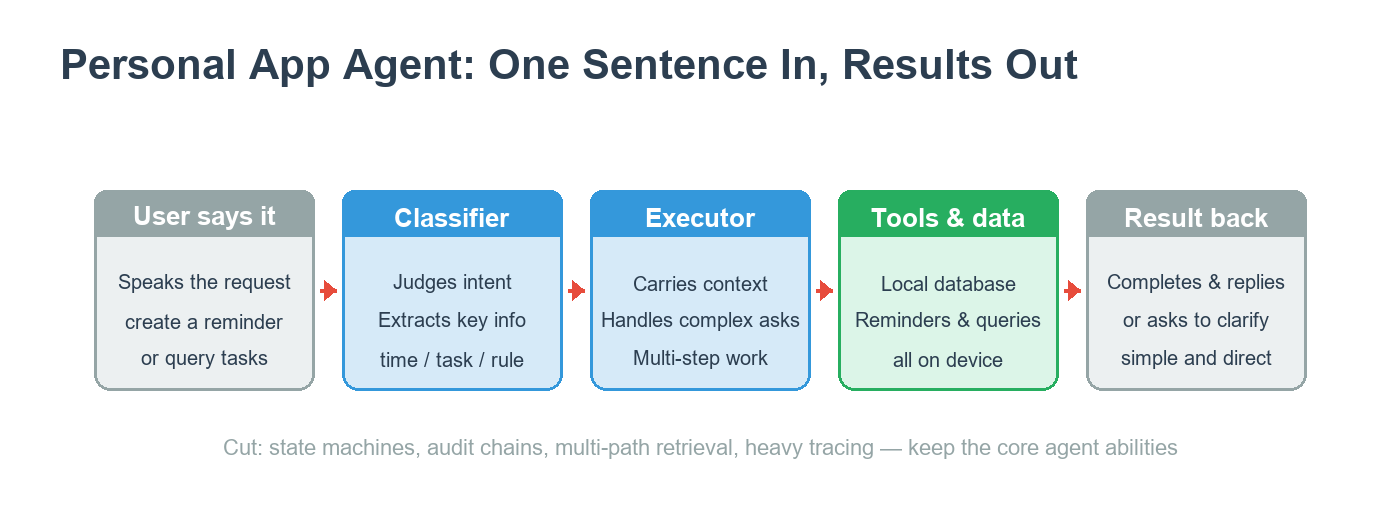
The first level is the classifier. When the user says one sentence, it decides whether this is “create a reminder,” “query my tasks,” or “change a setting,” and pulls out the key information: the time, the task name, the repeat rule. This layer’s rules are short, its cost is tiny, and it responds fast. Most simple requests are fully handled here.
The second level is the executor. When something genuinely needs more work — a complicated repeat rule, a multi-step request, an ambiguous intent that needs clarification — the request moves to the executor. It carries full business context and tool descriptions, and does the actual work.
The two layers pass structured data between them, with the classifier’s output feeding the executor’s input. This “wide entry, narrow exit” design made a real difference in daily use: cloud call cost came down noticeably, because most simple requests never reach the second level.
Intent recognition: three to five core intents are enough
Enterprise agents often define eight, nine, or eleven coarse states, and each business flow gets its own state machine. A personal app is simpler: the user speaks, the app processes, the app replies. You do not need a complex state machine. A plain state enum — waiting for input, processing, running a tool, error — is enough.
Intent recognition works the same way. A personal app’s scenarios are fixed, usually just three to five core intents: create a task, query a task, modify or delete a task, change a setting. One carefully designed single-layer classifier covers the overwhelming majority of cases. The small percentage of fuzzy requests — “just sort it out for me” — either falls through to the executor or gets turned back into a clarifying question.
Instructions: centralize them, keep them simple
Enterprise setups recommend pulling all instructions into a dedicated format with i18n decoupling, versioning, and a preview UI, plus character and context budgets to manage length. That pays off for large teams. For a solo developer, the maintenance cost outweighs the benefit.
For a personal app, keep it direct: define the instructions in one constant area or one file, easy to see at a glance; interpolate with plain template strings instead of a template engine; keep them in sync with the code, no versioning or rollback machinery. For multiple languages, maintain separate versions in the code.
There is one rule every agent should hold: never trim the sentence the user is currently speaking. You can compress history, shrink tool descriptions, and slim down context — but the words the user is saying right now stay complete, not a single one cut.
Tools: three to five core tools are enough
Enterprise agents often register ten or more tools, each carrying a full set of capability tags, plus a trust-and-side-effect matrix for runtime decisions.
A personal app’s scenario keeps the tool set tiny. Mine has four: create a reminder, query tasks, modify or pause or delete a task, and change settings. No parallel execution strategy — requests are serial, one thing at a time. No trust tiers — every tool is built into the app, there is no third-party tool injection. No approval flow — the user is the admin, no second confirmation needed. Tool descriptions stay short, because the model is tuned to a single scenario and already knows the shape the arguments should take.
Local-first: data and privacy as a natural advantage
Enterprise agents have to plan for masking, audit logs, and permission controls, because data moves through servers and involves many users, many roles, and compliance requirements.
A personal app has a natural privacy advantage: all data stays on the user’s own device. No masking layer, because data never leaves. No audit logs, because there is no multi-user operation. No approval flow, because the user owns the data. Data lives in a local database, with basic local encryption on top. No account system, no cloud sync — genuinely “your data belongs to you.”
This also means retrieval can be trimmed to almost nothing: no multi-path recall, no query rewriting, no result fusion. At this data scale and in this use case, a simple local query is all you need.
Error handling: retry and degrade are enough
Enterprise agents define multi-level recovery: forced tool retries, stepped context compression, resuming truncated answers, even pre-running side-effect-free tools to cut loop iterations.
A personal app can be more practical. If a model call times out or fails, retry once or twice, then return a friendly message. If a tool fails, say “I cannot handle this right now, please try again later.” If the output is malformed, request it once more with a stricter format. Every failure falls back to a “I do not know how to handle this” reply, so the app never crashes. Pre-running, resuming, forced tool use — a personal app does not need them. Every call is independent, output is short, and tool calls are optional.
Observability: lightweight logs, good enough
Enterprise agents ship a full tracing stack that can replay problems offline, run regression tests, and watch trends. A personal app does not need that, but it should not be blind either.
I log the input, output, and duration of each model call to a local log file, keep a trail of key operations like creating, editing, and deleting tasks, and record enough context on failures to investigate them. It is not replay-and-regression, but it finds ninety percent of problems for me. More importantly, it does not require standing up observability infrastructure. The energy goes into the product.
Run one simple path end to end first
Here is the summary of my principles for a personal app agent: a two-level design instead of full orchestration; a single-layer intent router with three to five intents and one lean set of rules; centralized instructions; three to five core tools; local-first data; simple error handling; lightweight logging.
“Good enough” is not “sloppy.” It is deliberate trimming, done after understanding why the enterprise design is complex in the first place. If you start from a full orchestration framework with eleven states and multi-layer tracing, your personal app will most likely die at the prototype stage. If you start from “a sentence goes in, the classifier sorts it, the executor does the work, the result comes back,” you can get the core path running in days, then add to it as real needs appear.
Google Play release: the gates an AI-native app has to pass
Once the architecture runs, release is another journey. For an AI-native personal app, a few things on Google Play deserve special attention.
Permissions are the most common trap. Ask for only what the app truly uses; prefer system capabilities over sensitive permissions. My app’s core abilities are voice input and local reminders, so its permission footprint is small. That respects the user and also makes review smoother.
A privacy policy is mandatory. AI-native apps involve voice input and intent parsing, and users are unusually sensitive about privacy. Before release, prepare a clear policy stating which data stays on device, which goes through cloud processing, and whether anything is retained. My app is local-first, so the policy is short and strong: data does not leave the device, and the cloud is only used for one-time understanding.
The data-safety form has to be filled carefully. Google Play asks developers to declare what data the app collects, for what purpose, and whether it is encrypted in transit. The key is honesty — declare what the code actually does.
There is also an easy-to-miss item: the Android ecosystem keeps changing its compatibility requirements for new devices, and you have to adapt your app’s install format and target version before submission, or you may be rejected close to launch. These issues are not hard, but they are real hurdles on the road.
Release is not the end. For a solo developer, shipping the app and getting it into real users’ hands is where the full loop begins. Building a personal app agent is the same: get one simple path working first, let users use it, then make it better.
These are my practice notes on building products in the AI era. In the following pieces, I will continue on how a solo developer closes the whole loop — from product definition to release and operations — with AI.