How I Replaced a Development Team with AI Tools
How a solo product builder used different AI tools as a practical development team, and what that workflow taught me about speed, review, and control.
Engineering — AI tools (June 30)
One of the most common questions I get is how a non-programmer managed to build a working Android app from scratch. The honest answer is that I didn’t do it alone — I had a development team. It’s just that my team was made up of AI tools.
The journey through different tools was an education in itself. I started with what was available and familiar — code assistants that could help with basic Flutter tasks. They were useful for simple things: generating a widget, fixing a syntax error, suggesting a pattern. But they struggled with larger context. If a bug involved multiple files, or required understanding the app’s architecture, the simpler tools couldn’t help.
As the project grew, I moved to more capable tools that could handle broader context. The breakthrough came when I found tools that could understand the entire project — not just individual files, but how they connected, what the data flow looked like, and where the potential issues were. This changed everything. Instead of asking “how do I write this function,” I could ask “why is this feature broken across three screens” and get a real answer.
By late May, my workflow had settled into a pattern: I would describe what I wanted to build, the AI would generate the code, I would test it, find issues, and iterate. The AI handled the implementation. I handled the product thinking, the testing, and the decisions about what mattered.
Each Tool Has Its Strength
Not all AI tools are the same. Some are better for generating new code from scratch. Others excel at analyzing existing code and finding bugs. Some understand Flutter specifically, while others are more general-purpose. Learning which tool to use for which task became a skill in itself.
For architecture-level thinking and complex debugging, I relied on tools that could reason about the whole system. For generating UI code and implementing features, I used tools that were faster and more focused on code generation. For strategic decisions and product reasoning, I used tools with broader knowledge of the mobile app landscape.
None of these tools was perfect. Each had blind spots, made mistakes, and required careful review. But together, they covered enough of the development spectrum that I could build a complete product without hiring a single developer.
The Day AI Almost Destroyed My Project
This story comes with a warning. One afternoon, I asked an AI tool to make a change that seemed straightforward — refactor a data model to support a new feature. The AI made the change, but it also, without telling me, modified several other files that it shouldn’t have touched. When I ran the app, everything was broken.
The tasks wouldn’t load. The reminders weren’t triggering. The settings screen crashed on open. For a moment — a terrifying moment — I thought I had lost weeks of work.
What saved me was Git. I had made it a habit to commit early and commit often, even when the changes seemed minor. I reverted the entire set of changes, went back to the last working commit, and started over. The second time, I reviewed every change the AI made before applying it.
That experience changed my workflow permanently. From that point on, I never let any tool make changes without my review. Git became my safety net. And I learned that AI tools are powerful, but they’re not infallible — and when they fail, they fail in ways that can be hard to spot until it’s too late.
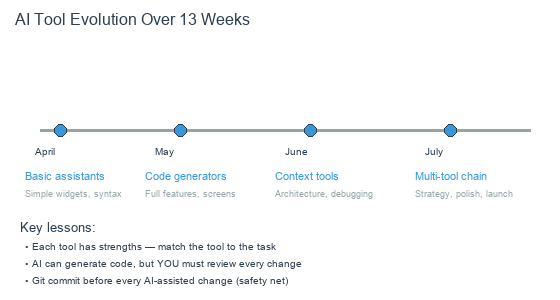
How my use of AI tools evolved as the project grew in complexity
What This Means for Solo Developers
The AI toolchain isn’t a replacement for skill — it’s a multiplier. I still had to understand what a good product looked like, how to test it, what questions to ask, and how to evaluate the code the AI generated. But the tools removed the barrier of having to write every line myself.
For someone coming from a product background, this is transformative. The skills I had spent 20 years building — understanding users, designing solutions, making tradeoffs — became directly applicable to building software, without a development team as an intermediary.