What AI Coding Tools Are Good At: Turning Bug Reports into Root-Cause Maps
A solo developer's notes on using AI coding tools to turn messy bug symptoms into structured root-cause maps — not faster code, so much as clearer thinking.
One of a series of Engineering articles based on my early development notes from building Lumi, an AI reminder assistant.
One morning a tester sent me a short message: “the reminder went off, but it said the wrong thing.” No stack trace. No steps to reproduce. Just a broken feeling delivered by a user who trusted the app less after that moment.
That message was typical of how bugs actually arrive in a small product. They rarely come as clean technical statements. They come as symptoms: the reminder appeared twice, the task vanished from the wrong screen, the conversation opened an old task, the app claimed something was updated while the next notification still used the old time. As a solo developer, I had to walk from that symptom back to a real cause — with no QA team, no second pair of eyes on the logs, and no one to argue with about which layer was guilty.
That is where the AI coding tool surprised me. I started using Qoder during Lumi’s early development expecting the usual help: generate code, explain errors, suggest fixes, save a few minutes inside Android Studio. It did all of that. But the most useful thing it did was not code at all.
A bug report is a feeling, not a cause
Early on, I learned that “the reminder time did not update” sounds like one issue. In reality it could live anywhere: the task record, the next trigger time, the native notification schedule, an old pending notification, a stale screen, or a response the assistant had already given. If I jumped straight into editing code, I usually made the system more confusing.
The habit that changed things was slower. Before touching anything, I would ask four questions: what did the user do, what should have happened, what actually happened, and which part of the chain can prove the failure? That last question mattered most, because a bug report gives you the pain but never the proof.
The map I learned to draw
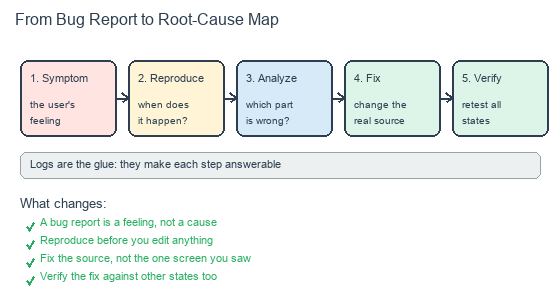
The same five steps I came to lean on for every unclear failure.
The pattern that kept working was a simple one: capture the symptom, reproduce it, locate the root cause, fix the real source, then verify against more than the one path I had tested. This is not an original idea, and it is not AI magic. But Qoder was genuinely good at helping me write it down. I could paste a rough description and get back a debugging checklist — what to compare before and after, which logs would prove the theory, what edge cases the fix should cover. That checklist usually mattered more than the first suggested code change.
A real example: the reminder that said the wrong thing
The tester’s message eventually became a week of work. A recurring reminder fired at the right moment, but the notification content was stale — it described a previous occurrence. I set reminders at different times, with different repeat patterns, and waited. Nothing failed for two days. The bug was real but unstable, which made it worse than a crash.
The breakthrough was a pattern: it happened when a recurring reminder crossed a time boundary. The root cause turned out to be small — one piece of metadata was not refreshed when the reminder rolled over to its next occurrence. The fix was small too. But finding it took fourteen rounds of systematic testing, each one narrowing the space. That is the version of debugging AI tools are best at: not guessing the answer, but keeping the investigation honest long enough for the answer to surface.
Logs became part of product design
Before Lumi, I thought of logs as something you add when debugging. During early development they became part of product design. A reminder app has many invisible steps. The user sees a card, and later a notification, but behind that sit saved tasks, trigger times, status changes, permission checks, and scheduled alarms.
When something went wrong, the product had to explain itself to me. Did it create the right task? Did it replace the old schedule? Did it cancel the old pending reminder? Did the visible state match the stored state? Good logs made those questions answerable. Qoder helped me decide where to add diagnostic output and what to compare across a change. It never removed the need for judgment — some logs were too noisy, some pointed at the wrong layer — but the habit of instrumenting a problem before fixing it made fixes safer.
The public story of AI coding tools is mostly about speed. Speed matters. But for me the deeper value was structure: turning vague failures into reproducible cases, and reproducible cases into fixes I could believe in. For a solo developer, that is the difference between patching symptoms and actually improving the product.
If you are building with AI tools, try this on your next confusing bug: write the symptom down, name what would prove the cause, and only then open the editor. If you are curious about the reminder app behind these notes, more on Lumi is on the way.