The Hidden Complexity of Reminder Apps: State Is the Product
The hard part of a reminder app is not the first screen. It is state. Lessons from building Lumi's reminder engine.
One of a series of Engineering articles based on my early development notes from building Lumi, an AI reminder assistant.
Reminder apps look simple from the outside. A user creates a task, picks a time, and waits for a notification. That simplicity is part of the appeal. Nobody wants a reminder app that feels like enterprise software.
But while building Lumi, I learned that the hard part of a reminder app is not the first screen. It is state.
A reminder is not only a title and a time. It can be active, completed, deleted, paused, resumed, updated, rescheduled, repeated, skipped, or shown in different views. It may have future trigger times, past reminder records, conversation history, and a notification already scheduled by the operating system. When one part changes, other parts must change with it. That is where many bugs hide.
Editing is not just editing
Changing a reminder sounds simple. If a user moves a reminder from 6 PM to 7 PM, the app should update the time. But the system also has to decide what happens to the old pending trigger. If the old trigger survives, the user may get two notifications. If the new time is saved but the native scheduler is not refreshed, the app may still ring at the old time.
The visible edit screen is only one part of the operation. A correct edit has to update the task, the future trigger state, the reminder history rules, and the scheduled notification path. That is a state transition, not a field update.
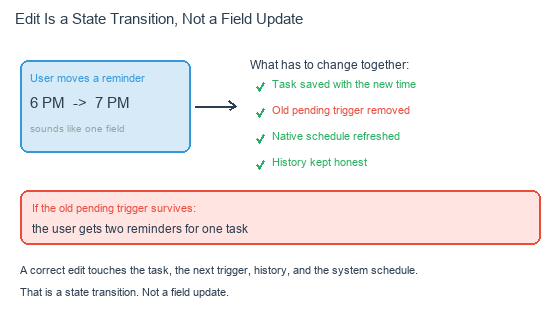 Every change touches more than the field the user sees.
Once I started thinking this way, several bugs became much easier to explain. The duplicate reminder after an edit was not a mystery. It was a state transition that had skipped a step.
Deletion also has a future
Deleting a task is the same story from the other side. In the UI, deletion feels final. The item disappears. But if the product has already created future trigger records or pending notification requests, deleting the task must also clean up the future.
Otherwise the user sees a ghost: a calendar dot for a task that no longer exists, a reminder that should have stopped, or a link from chat history to something that is gone. This kind of bug is frustrating because it breaks the most basic expectation — delete should mean the app stops acting on that task. If the system keeps a future piece alive, the product feels broken.
Recurring reminders multiply state
Recurring reminders make all of this harder. A daily reminder is not one future moment; it is a rule that produces many future moments. A monthly reminder may appear in calendar views, reminder lists, and upcoming schedules. A paused recurring reminder should stay quiet for a while, then return. One completed occurrence should not make the whole recurring task disappear.
Recurring reminders are not repeated copies of a one-time task. They are long-lived objects with a relationship between the rule, the next occurrence, and the history of what already happened. If the app treats those pieces casually, users will feel it. They may not call it a state-management problem, but they will describe it as unreliable.
The database model must match the product model
Early schemas often start simple because the product starts simple. That is reasonable. But as behavior becomes more real, the schema has to match the product’s actual promises.
For Lumi, that meant separating the idea of a task from its future trigger times and its reminder history. It meant taking versioning, deletion, and status seriously. The product needed to answer questions like: what is the current task, what reminders are still pending, what happened before, and what should no longer happen? Those questions are not implementation trivia. They are the product.
The lesson I would share with other builders is this: if your app reminds, schedules, edits, or repeats anything, state is not a backend detail. It is the behavior users rely on. A clean interface matters. Natural language input matters. But if state transitions are not reliable, the app will feel broken no matter how polished the UI looks.
The hard part of a reminder app is not making a list. It is making sure the product remembers exactly what should still happen, what already happened, and what must never happen again.
More on how Lumi keeps its state honest — from schedules to notifications — is coming in this series.