Week 10: The Bug That Only Happened at 10 PM
How an intermittent recurring-reminder bug led to 14 rounds of testing, a small metadata fix, and a sharper release process before launch.
Build in Public - Week 10 (June 22-30)
Some bugs are obvious. The app crashes on startup. The button doesn’t respond. The text is in the wrong language. You fix them quickly and move on. Then there are bugs that only happen at 10 PM on a recurring reminder that was set three days ago, and by the time you check, it’s already 10:02 and the moment has passed.
This was Week 10’s problem: an intermittent bug in the reminder scheduling system. Most of the time, reminders fired correctly. But occasionally - unpredictably - a recurring reminder would show the wrong information when it triggered. The notification would arrive at the right time, but the content would be wrong. It was the kind of bug that made users lose trust in the product without being able to explain exactly what went wrong.
The first challenge was reproducing it. I would set a reminder, wait for it to fire, and it would work perfectly. I would try different times, different recurrence patterns, different intervals - everything worked. Then a tester would report it, and by the time I checked my own device, the issue was gone. The bug was real but inconsistent. Reproducing it became my first priority.
The Breakthrough
After several days of testing, I noticed a pattern. The bug seemed to happen when a recurring reminder crossed a certain time boundary. Not every time, but often enough to be meaningful. I set up a test with multiple reminders set to different times and waited.
The root cause, once I found it, was something simple that had complex consequences. When a recurring reminder triggered and rescheduled itself for the next occurrence, one piece of metadata wasn’t being updated correctly. The reminder fired at the right time - the scheduling logic was sound - but the information displayed to the user was pulled from a field that hadn’t been refreshed after the recurrence. So the user got a notification about the wrong occurrence.
The fix itself was straightforward: update the relevant data when the reminder rolls over to its next occurrence. But finding that single missing update in a system with multiple connected data fields took days of systematic testing.
The Testing Process
I ended up running 14 rounds of systematic testing on this one issue. Each round tested a different scenario: daily reminders, weekly reminders, reminders set at different times of day, reminders that crossed midnight, reminders with custom recurrence patterns. I logged every result, noted every failure, and refined my understanding of the bug with each iteration.
This was the kind of testing I was familiar with from enterprise software, but applying it to my own product felt different. In a corporate setting, testing is something you plan and delegate. Here, it was just me, my phone, and a growing list of test cases. No one else was going to find this bug. If I missed it, it would go to production.
I also relied on crash reporting and analytics to catch issues I couldn’t reproduce myself. Firebase provided basic crash data, and I had added some custom logging to track reminder behavior. When a crash report came in, I could trace it back to the specific reminder operation that caused it. This visibility was crucial for catching the edge cases that my own testing missed.
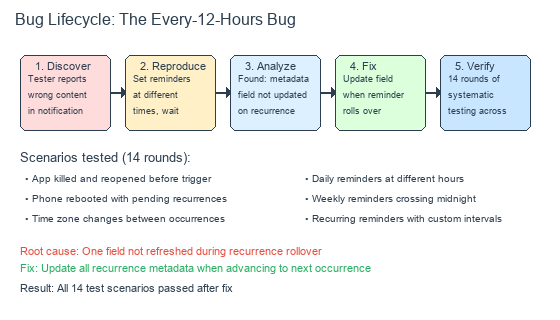
How an intermittent bug was found, reproduced, and fixed through systematic testing
The Final Polish
With the recurrence bug fixed, Week 10 became about polish. The onboarding flow was refined based on tester feedback. The help center was expanded with more examples. The app rating prompt was implemented in a way that wouldn’t interrupt users at inappropriate moments.
Each change was small, but together they made the product feel more complete. The difference between an MVP and a product you’d actually charge for is in these details - the error messages that actually help, the loading states that don’t feel like waiting, the settings that make sense without a manual. Week 10 was about closing as many of these gaps as possible before launch.
What I Learned
Week 10 reinforced something I already knew but needed to experience firsthand: the hardest bugs aren’t the ones that break everything. They’re the ones that almost work. A bug that fails 20% of the time is worse than one that fails 100% of the time, because the first one convinces you the system is working when it isn’t. Systematic testing - not random checking - is the only way to catch these.
Next week: launch day.