Week 7: White-Box Testing My Own AI Reminder App
How testing became part of product development for Lumi, from natural-language edge cases to reminder state, notifications, and release risk.
Build in Public - Week 7 (June 1-7)
In week 7, testing stopped being a separate activity. It became part of product development. Before building Lumi, I already knew testing was important. I had spent many years around enterprise software, where release checklists, business scenarios, exception cases, and user acceptance testing are normal. But building an AI reminder app made testing feel different. The product was small compared with enterprise software, but the behavior space was surprisingly large.
A user can create a reminder in many ways. They can modify it in many ways. They can ask unclear questions. They can use natural language, short commands, incomplete sentences, mixed languages, or casual phrases. The app then has to turn that into a reliable task, save it, display it, and remind the user at the right time. That is not just UI testing. That is product behavior testing.
AI makes the input space wider
In a traditional app, the user clicks a button or fills a form. The path is relatively controlled. In Lumi, the user may type: “Remind me to drink water at 3.” “Set a reminder for 3 PM.” “Tell me to drink water later this afternoon.” “Every day after lunch, remind me to walk.” These may mean similar things, but they are not the same input. This is where AI products become tricky. The app has to handle intent, not just exact commands. So I could not test only the happy path.
I had to test families of behavior: creating reminders, editing reminders, deleting reminders, pausing and resuming, recurring reminders, ambiguous requests, permission states, and notification delivery. The more I tested, the clearer it became that a good AI app still needs very traditional QA discipline.
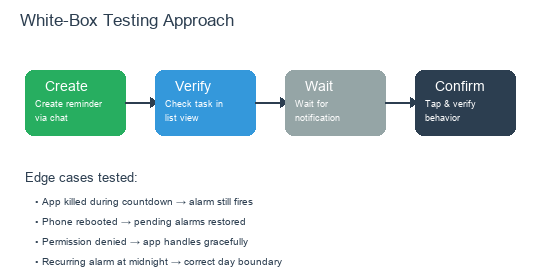
Testing flow from creation through notification, with edge case verification
Testing the state, not just the screen
One important shift was testing the underlying product state, not only the visible screen. If the app says “Reminder created,” that is not enough. Was the task actually created? Was the reminder time correct? Will it appear in the right list? Will the notification be scheduled? If the task is edited, did the old reminder behavior change correctly? If it is deleted, is it really gone from future reminders? If it is paused, does it stay paused?
For a reminder app, the screen is only one part of the truth. The real truth is the full chain: user request, understood intent, saved task, scheduled reminder, visible notification. If any link breaks, the user experiences a broken product.
My test checklist became a product map
At first, I wrote tests to find problems. Later, the test checklist became a map of the product. It covered startup behavior, permissions, initialization, task creation, task editing, deletion, pause and resume, duplicate taps, reminders, notifications, device conditions, and recurring scenarios. This helped me see the product more clearly. Each test case represented a promise to the user. If Lumi allows a user to pause a reminder, then pause must really work.
If Lumi shows today’s reminders, the user should not have to wonder whether the number is correct. If Lumi creates a recurring reminder, the future behavior must be predictable. Testing made the promises visible. That is useful for a solo developer because there is no separate QA team to catch the gaps. You have to make the gaps visible yourself.
Crash reporting changed the mindset
Another important part of this stage was crash reporting. When you build alone, it is tempting to trust your own device too much. “It works on my phone” feels reassuring, but it is not enough. Real users have different devices, different Android versions, different permissions, different languages, different network conditions, and different habits. Crash reporting helps move the product from “I think it works” to “I can diagnose when it does not.” That shift matters before launch.
If a user hits a crash and you have no visibility, you are blind. You may hear “the app doesn’t work,” but you do not know where to look. For a solo app, basic observability is not a luxury. It is part of being able to support the product.
Testing also controlled release risk
By week 7, I had to become more careful with changes. When a product is early, it is easy to keep adding and changing. But as release gets closer, every change carries risk. Testing helped separate two types of work: work that improves the product safely, and work that may open new risk before launch. This is a discipline I learned from enterprise software, but it applies strongly to solo development. Late-stage changes should be smaller. Fixes should be targeted. Verification should match the risk.
If a change affects reminder reliability, it deserves more testing than a text change. If a change affects subscription or permissions, it deserves careful scenario testing. This kind of thinking prevented me from treating all changes as equal. They are not equal. Some changes are cosmetic. Some changes touch trust.
What I learned in week 7
The biggest lesson from week 7 was that testing is not something you do after building the product. Testing is how you discover what the product really is. For Lumi, testing exposed where natural language, task state, reminder scheduling, notification behavior, and user trust all meet. It also reminded me that AI does not remove the need for traditional engineering discipline. Actually, it increases the need. Because AI makes input flexible, the rest of the system must be even more dependable.
A solo developer does not need a corporate QA process. But a solo developer absolutely needs a testing habit. For Lumi, that habit became part of the product.