Why I Built Lumi: From a Simple Reminder Problem to an AI Personal Assistant
Why I started this project, what problem I wanted to solve, and how Lumi gradually became an AI-powered reminder assistant.
This is the first article in my Lumi building journey — why I started this project, what problem I wanted to solve, and how Lumi gradually became an AI-powered reminder assistant.
It Started with a Very Simple Problem
The original idea behind Lumi did not come from a big product vision. It came from a small, familiar moment.
Sometimes I suddenly remember something important — maybe I need to call someone later, prepare something before going out, or pay attention to a task tomorrow morning. At that moment, I know clearly:
If I do not write it down now, I will probably forget it later.
This problem became even more obvious when I thought about my parents. As people get older, forgetting small but important things becomes more common — taking medicine, bringing keys before leaving home, remembering an appointment, doing something at the right time. These are not complicated tasks, but when they are missed, they can create real trouble.
And this is not only a problem for older people. When life becomes busy, anyone can forget things. Work tasks, family matters, bills, meetings, health routines, shopping lists, personal plans — once everything comes together, it becomes very easy to lose track. Sometimes reminders overlap, schedules conflict, or I remember the task but forget the time.
That was the starting point. I wanted a simple way to capture these small but important things before they disappeared from my mind.
I Tried the Existing Solutions
The first solution was obvious: the phone alarm. Phone alarms are simple and reliable, but they are not really designed for task reminders.
They work well for fixed times, such as waking up at 7 AM, but they become awkward when the reminder is more complex. For example:
- Remind me every three days.
- Remind me every other Sunday.
- Remind me on the last business day of each month.
- Pause this reminder until next Monday.
- Move tomorrow’s reminder one hour later.
A normal alarm is not built for this kind of natural task management. It is also not convenient to modify reminders during real life. If I am in a meeting, I may want to pause a reminder quickly. If my plan changes, I may want to move a reminder to another time. If a task is no longer needed, I may want to delete it without searching through a long alarm list.
Then I looked at existing task management and reminder apps. Many of them are powerful, but for my use case, they often felt too heavy. Some require registration, some require too many fields, and some expect users to understand projects, tags, priorities, lists, templates, and workflows.
These features are useful for professional task management. But sometimes I only want to say:
Remind me to call John tomorrow morning.
I do not want to open a form, select a category, choose a repeat rule, set a priority, and save multiple fields.
The problem was not that existing tools were bad. The problem was that many tools required me to adapt to the software. I wanted the software to understand me.
Then AI Changed the Direction
After using modern AI chatbots, I started to think differently. The most important change brought by AI is not just that it can answer questions — it can understand natural language.
This means software does not always have to begin with buttons, forms, and menus. Maybe the user can simply describe what they want, and the system can understand the intent, extract the key information, and take action. That idea felt very suitable for reminders.
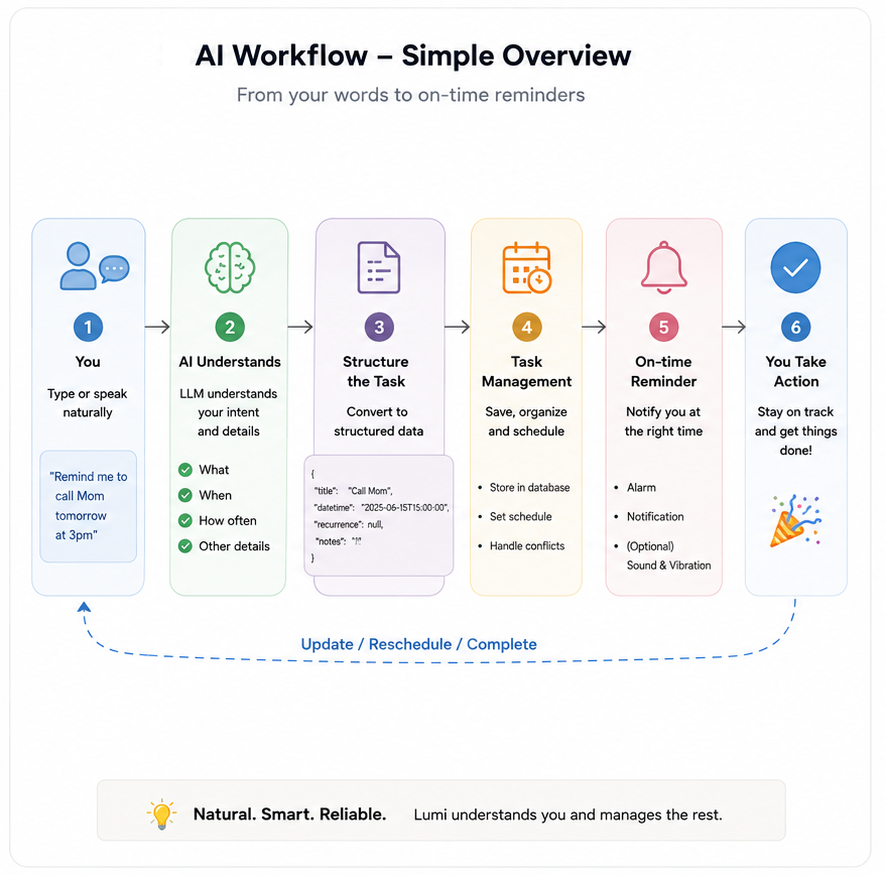
Instead of building another traditional task form, I wanted to build something closer to a personal assistant. You tell it what you need. It understands the request. It creates or updates the reminder. And when the time comes, it reminds you.
In other words:
A reminder app should not only store tasks. It should help manage things like a lightweight personal assistant.
That became the core idea of Lumi.
From Idea to Product
Before building Lumi, I did not want to jump directly into coding. My background is in enterprise software and digital systems, so I naturally used a product planning process that was familiar to me.
I looked at several questions:
Is the problem real?
For me, yes. For my parents, yes. For busy people, students, freelancers, small business owners, caregivers, and anyone managing many daily tasks, the problem also seemed real.
Are existing solutions enough?
Existing alarms are simple but not flexible. Traditional task management apps are powerful but often too complex. There seemed to be space for something simpler:
a natural-language reminder assistant.
Can AI solve this better?
AI can understand flexible expressions such as:
- tomorrow morning
- every other Sunday
- last Friday of each month
- pause until next week
- move it one hour later
This made the user experience much closer to conversation.
What are the risks?
There were also clear risks:
- AI response speed
- LLM cost
- accuracy of time and recurrence parsing
- privacy concerns
- Android background reminder reliability
- Google Play subscription and release requirements
These risks were important, but they seemed manageable. So I decided to build a small but complete version first.
The Basic Architecture
The first version of Lumi was designed around a simple principle:
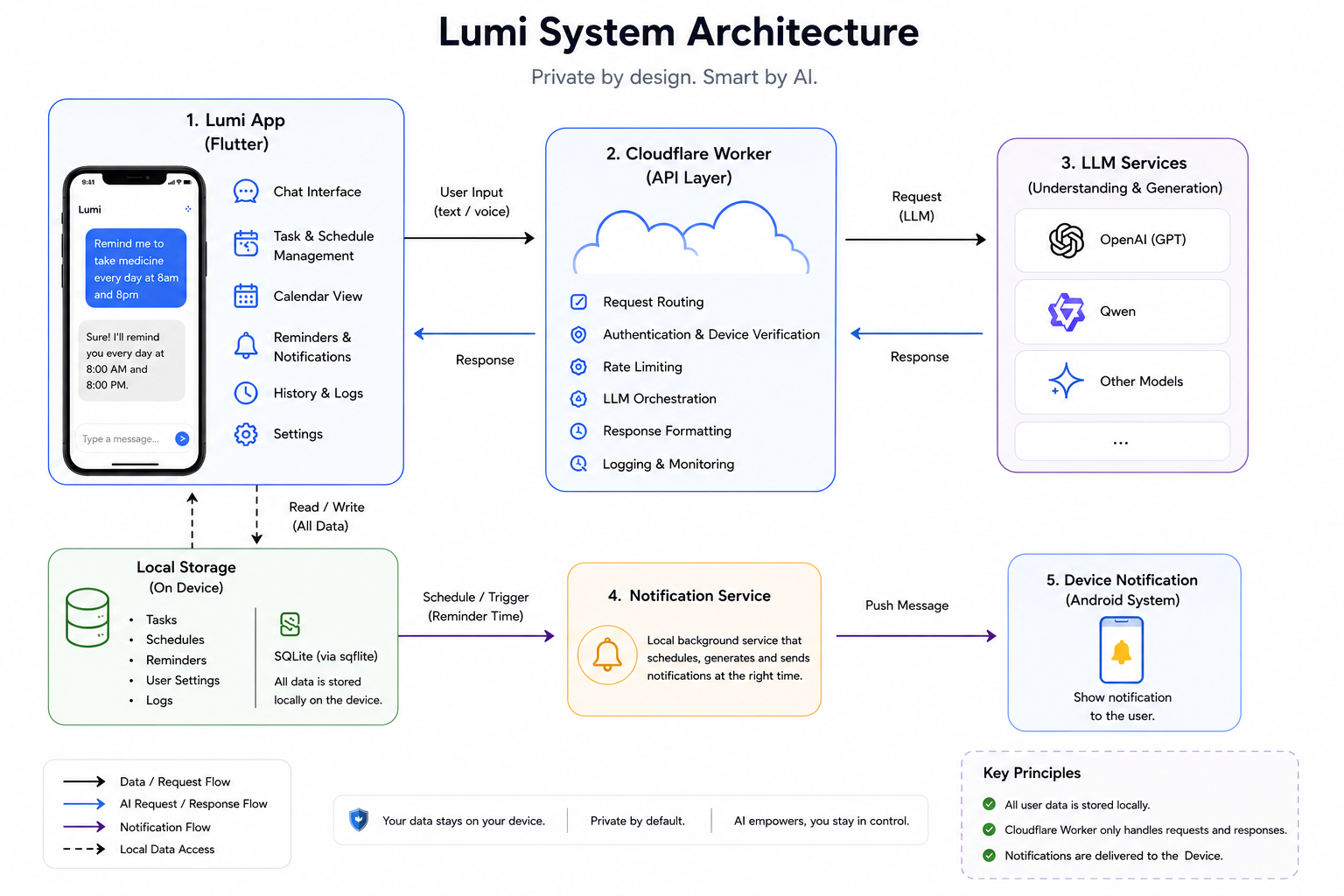
Use AI to understand the user, but keep personal reminder data local whenever possible.
The basic flow is:
User
  ↓
Natural language input
  ↓
Lumi mobile app
  ↓
LLM processing
  ↓
Structured reminder data
  ↓
Local storage
  ↓
Android alarm / notification
The app uses Flutter for the mobile client. The AI request is routed through a server-side proxy. The reminder data is stored locally on the device. The system then schedules alarms and notifications based on the structured reminder result.
the architecture diagram is :
Building Lumi
The development process included several parts:
- defining the reminder types
- designing the conversation flow
- building the local database structure
- handling create, update, delete, pause, and resume actions
- designing the reminder scheduling engine
- testing Android alarm and notification behavior
- building the user interface
- integrating subscription logic
- preparing Google Play assets
- running closed testing before launch
In the beginning, Lumi only needed to handle simple reminders. Then it gradually expanded to support daily, weekly, monthly, yearly, and more advanced recurrence rules.
Later, I added support for more natural expressions, such as:
- every 8 hours
- every 3 days
- every other Sunday
- first Saturday monthly
- last Friday monthly
- first business day
- last business day
- pause until next Monday
The most difficult part was not creating a nice chat interface. The real challenge was turning flexible human language into reliable reminder behavior. A user can say the same thing in many different ways, and the system has to understand the intent, extract the time, decide the recurrence rule, avoid conflicts, and still behave predictably.
What Lumi Is
Lumi is an AI-powered reminder assistant designed for people who want a simpler way to manage reminders through natural conversation. Instead of filling out complicated forms, users can simply say what they want to remember.
For example:
Remind me to take my medicine every day at 8 AM.
Remind me to pay my credit card bill on the 25th of every month.
Pause my gym reminder until next Monday.
Move tomorrow's dentist appointment one hour later.
Lumi tries to understand these requests and turn them into working reminders. The goal is not to replace every professional task management tool — it is to make everyday reminders faster, easier, and more natural.
What I Learned
Building Lumi reminded me of something important. AI does not simply make software smarter — it changes the relationship between users and software.
Traditional software often asks users to learn its structure. AI-powered software can begin from the user’s own language. This does not mean forms, buttons, and menus will disappear, but it does mean that many daily tasks can become easier.
For me, Lumi is not only a reminder app. It is also an experiment:
Can a personal tool feel more like an assistant than a database? Can AI make small daily tasks easier instead of more complicated? Can a solo developer build a useful AI product by combining product thinking, software engineering, and real user needs?
I am still exploring these questions. This article is the beginning of that journey. In the next articles, I will share more about the product design, technical architecture, development process, testing, and launch experience behind Lumi.
Originally written for the Lumi development blog. More articles coming soon.